> ## Documentation Index
> Fetch the complete documentation index at: https://docs.resolve.ai/llms.txt
> Use this file to discover all available pages before exploring further.
# Alert Webhooks
Transform any webhook payload into an alert event. This flexible integration handles webhooks from monitoring systems that don't have first-class integrations.
Prerequisite: Check that you can access the [Integrations Page](https://app0.resolve.ai/integrations) in ResolveAI. You'll need to be an admin for your organization to visit this page and make changes.
## 1. In Resolve, create a webhook
1. Open the [Integrations Page](https://app0.resolve.ai/integrations)
2. Click **Alert Webhook**
3. Click **Add Connection**
4. Add a **Name** for your new webhook
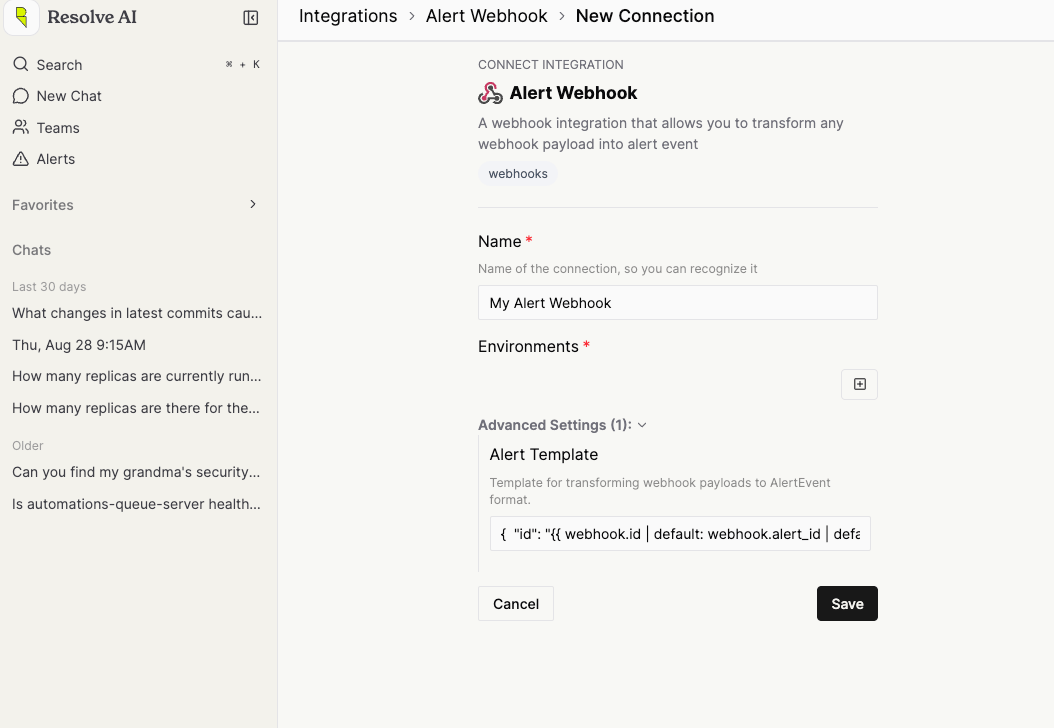 5. Click **Save**
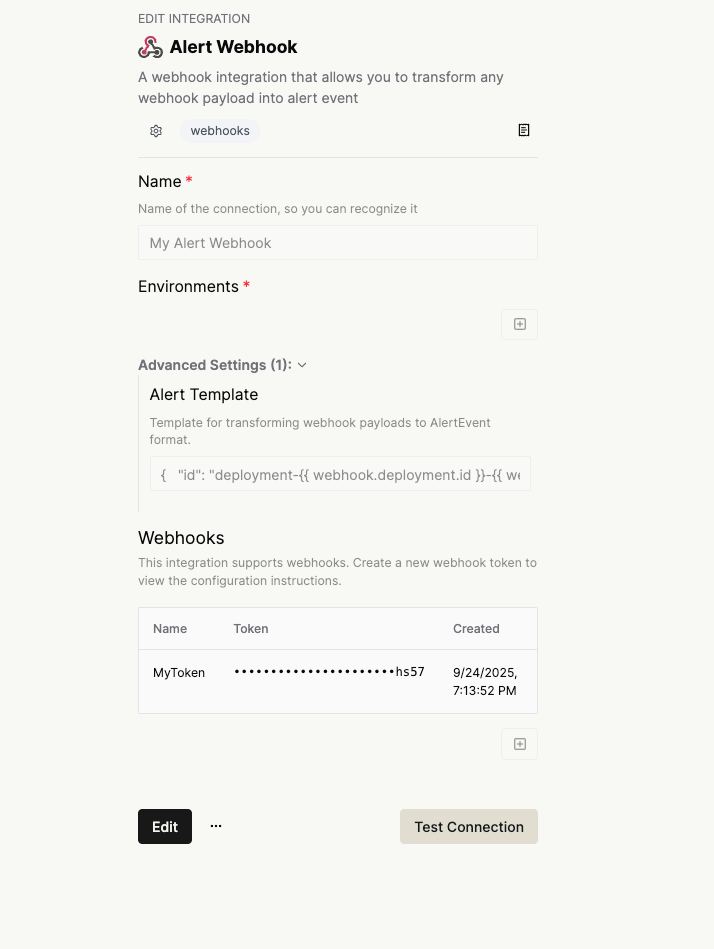
6. Click the **Name** to re-open the integration instance.
7. Click **Edit**
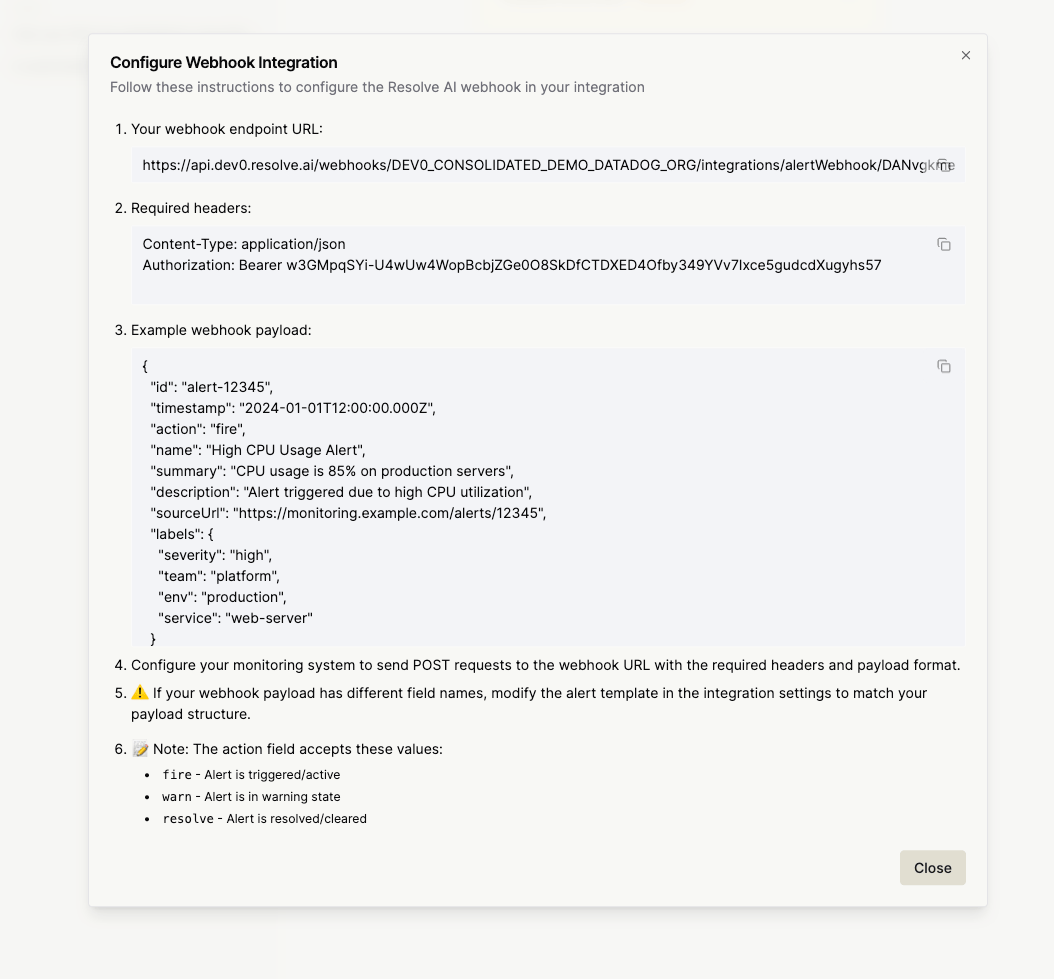
8. Click `+` under **Webhooks** to create a new webhook. This will show custom generate instructions, with secrets unique to this webhook. *Note*: Ensure you finish the instructions before closing, or you will have to create a new webhook.
9. Configure your monitoring system to `POST` to the **Endpoint URL** with the **Required Headers** Bearer token:
* Either in the headers: `Authorization: Bearer `
* As query params: `url?token=`
5. Click **Save**
6. Click the **Name** to re-open the integration instance.
7. Click **Edit**
8. Click `+` under **Webhooks** to create a new webhook. This will show custom generate instructions, with secrets unique to this webhook. *Note*: Ensure you finish the instructions before closing, or you will have to create a new webhook.
9. Configure your monitoring system to `POST` to the **Endpoint URL** with the **Required Headers** Bearer token:
* Either in the headers: `Authorization: Bearer `
* As query params: `url?token=`
 10. **Enable Integration**: Switch the webhook on and manage webhook tokens from the post-setup view
 ### Alert Template Configuration
The alert template uses template syntax to transform incoming webhook payloads. The template should output valid JSON that matches the AlertEvent schema.
#### Required Fields
Your template must include these required fields:
* `id`: Unique identifier for the alert
* `time`: Timestamp in ISO8601 format
* `action`: One of "fire", "warn", or "resolve"
#### Template Context
Templates have access to:
* `webhook`: The incoming webhook payload
* `now`: Current timestamp in ISO8601 format
#### Example Template
```template theme={null}
{
"id": "{{ webhook.id | default: (webhook | hash) }}",
"time": "{{ webhook.timestamp | iso8601 }}",
"action": "{{ webhook.action | default: 'fire' }}",
"name": "{{ webhook.name | default: 'Alert' }}",
"summary": "{{ webhook.summary | default: webhook.message }}",
"description": "{{ webhook.description }}",
"sourceUrl": "{{ webhook.sourceUrl }}",
"labels": {{ webhook.labels | json }},
"isHighPriority": {{ webhook.priority | to_boolean }},
"threshold": {{ webhook.threshold | to_number }}
}
```
### Custom Filters
Use custom filters to transform the data you send via webhook:
#### Type Conversion Filters
* **`to_number`**: Converts values to numbers, defaults to 0 for invalid values
* **`to_boolean`**: Converts values to boolean (handles "true"/"1" as true)
* **`iso8601`**: Converts date values to ISO8601 format, falls back to current time
#### Data Processing Filters
* **`regex_extract`**: Extracts text using regex patterns
* **`json`**: Serializes values to JSON strings
* **`default`**: Provides fallback values for empty/null fields
* **`hash`**: Generates consistent hash values for creating alert IDs
* **`date`**: Enhanced date filter with "now" keyword support
#### Filter Usage Example
```template theme={null}
{
"id": "{{ webhook.alert_id | default: (webhook | hash) }}",
"time": "{{ webhook.created_at | iso8601 }}",
"action": "{{ webhook.status | default: 'fire' }}",
"name": "{{ webhook.title | regex_extract: '^\\[([^\\]]+)\\]' | default: 'Alert' }}",
"isHighPriority": {{ webhook.severity | to_boolean }},
"threshold": {{ webhook.limit | to_number }},
"labels": {{ webhook.tags | json }}
}
```
### Webhook Payload Examples
#### Basic Alert Payload
```json theme={null}
{
"id": "alert-12345",
"timestamp": "2024-01-01T12:00:00.000Z",
"action": "fire",
"name": "High CPU Usage Alert",
"summary": "CPU usage is 85% on production servers",
"description": "Alert triggered due to high CPU utilization",
"sourceUrl": "https://monitoring.example.com/alerts/12345",
"labels": {
"severity": "high",
"team": "platform",
"env": "production",
"service": "web-server"
}
}
```
#### Custom Monitoring System Payload
```json theme={null}
{
"alert_uuid": "abc-123-def",
"created": "2024-01-01T12:00:00Z",
"status": "triggered",
"title": "[CRITICAL] Database Connection Pool Exhausted",
"message": "Connection pool for production database is at 100% capacity",
"priority": "1",
"tags": {
"environment": "production",
"component": "database",
"team": "backend"
},
"threshold_value": 100,
"monitor_url": "https://custom-monitor.com/alerts/abc-123-def"
}
```
Template for custom payload:
```template theme={null}
{
"id": "{{ webhook.alert_uuid }}",
"time": "{{ webhook.created | iso8601 }}",
"action": "{{ webhook.status | default: 'fire' }}",
"name": "{{ webhook.title | regex_extract: '^\\[([^\\]]+)\\](.+)' | default: webhook.title }}",
"summary": "{{ webhook.message }}",
"sourceUrl": "{{ webhook.monitor_url }}",
"isHighPriority": {{ webhook.priority | to_boolean }},
"threshold": {{ webhook.threshold_value | to_number }},
"labels": {{ webhook.tags | json }}
}
```
### Advanced Configuration
#### Custom Field Mapping
Map webhook fields to specific alert properties:
```template theme={null}
{
"id": "{{ webhook.incident_id }}",
"time": "{{ webhook.occurred_at | iso8601 }}",
"action": "{% if webhook.state == 'open' %}fire{% elsif webhook.state == 'resolved' %}resolve{% else %}warn{% endif %}",
"name": "{{ webhook.incident_name }}",
"summary": "{{ webhook.description | truncate: 200 }}",
"attribution": {
"entityKey": "{{ webhook.service_name }}",
"confidence": {{ webhook.confidence | to_number }}
},
"metadata": {
"runbook": "{{ webhook.runbook_url }}",
"dashboard": "{{ webhook.dashboard_url }}"
}
}
```
#### Conditional Logic
Use conditionals for complex transformations:
```template theme={null}
{
"id": "{{ webhook.id }}",
"time": "{{ webhook.timestamp | iso8601 }}",
"action": "{% case webhook.severity %}
{% when 'critical' or 'high' %}fire
{% when 'medium' %}warn
{% else %}resolve
{% endcase %}",
"isHighPriority": {% if webhook.severity == 'critical' %}true{% else %}false{% endif %},
"labels": {
{% for tag in webhook.tags %}
"{{ tag.key }}": "{{ tag.value }}"{% unless forloop.last %},{% endunless %}
{% endfor %}
}
}
```
#### Array Processing for Labels
Avoid this if possible, as templates with loops cannot be health checked.
Build labels from array data using for loops:
```template theme={null}
{
"id": "{{ webhook.id }}",
"time": "{{ webhook.timestamp | iso8601 }}",
"action": "fire",
"name": "{{ webhook.name }}",
"labels": {
{% for tag in webhook.tags %}
"{{ tag.name }}": "{{ tag.value }}"{% unless forloop.last %},{% endunless %}
{% endfor %}
}
}
```
Example webhook payload with arrays:
```json theme={null}
{
"id": "alert-123",
"timestamp": "2024-01-01T12:00:00Z",
"name": "High Memory Usage",
"tags": [
{"name": "environment", "value": "production"},
{"name": "service", "value": "web-server"},
{"name": "team", "value": "platform"}
],
"tagString": "severity:high,region:us-east-1,instance:web-01"
}
```
### Troubleshooting
#### Common Issues
1. **"Missing required field" errors**: Ensure id, time, and action are present in template output
2. **Invalid JSON output**: Verify template produces valid JSON syntax
3. **Type conversion errors**: Use appropriate filters for data type conversion
4. **Template rendering timeouts**: Simplify complex templates or reduce payload size
#### Debugging Templates
1. Use the template validation feature during configuration (Coming Soon)
2. Test with sample webhook payloads (Coming Soon)
3. Check health check results for validation errors
### Integration with Monitoring Systems
The Alert Webhook integration can receive webhooks from various monitoring systems. Configure your monitoring system to send POST requests to the provided webhook URL with the Bearer token in the Authorization header.
Supported webhook actions:
* `fire`: Alert is triggered/active
* `warn`: Alert is in warning state
* `resolve`: Alert is resolved/cleared
For monitoring systems that don't use these exact values, use template logic to map their status values to the supported actions.
***
### Template Generation Assistant
Use this prompt with Claude to automatically generate a webhook template for your specific payload structure:
#### Prompt for Template Generation
```text theme={null}
You are an expert in creating Alert Webhook templates for transforming webhook payloads into AlertEvent format using LiquidJS templating with custom filters. Please help me create a template based on my webhook payload.
## Template Requirements
The template uses LiquidJS syntax with custom filters designed for webhook transformation.
### Required Fields (MUST be included):
- `id`: Unique identifier for the alert
- `time`: Timestamp in ISO8601 format
- `action`: One of "fire", "warn", or "resolve"
### Optional Fields:
- `name`: Alert name/title
- `summary`: Brief alert description
- `description`: Detailed alert description
- `sourceUrl`: Link to alert source/dashboard
- `isHighPriority`: Boolean for priority status
- `threshold`: Numeric threshold value
- `labels`: Object with key-value pairs for categorization
- `metadata`: Additional metadata object
- `attribution`: Object for linking to alert rules
### Available Custom Filters:
- `default: 'fallback'` - Provides fallback values
- `iso8601` - Converts dates to ISO8601 format
- `to_number` - Converts to numbers (defaults to 0)
- `to_boolean` - Converts to boolean
- `json` - Serializes to JSON string
- `hash` - Generates consistent hash for IDs
- `regex_extract: 'pattern'` - Extracts text using regex
### Template Context:
- `webhook.*` - Access webhook payload fields
- `now` - Current timestamp in ISO8601 format
### Example Template Structure:
{
"id": "{{ webhook.id | default: (webhook | hash) }}",
"time": "{{ webhook.timestamp | iso8601 }}",
"action": "{{ webhook.status | default: 'fire' }}",
"name": "{{ webhook.title | default: 'Alert' }}",
"summary": "{{ webhook.message }}",
"isHighPriority": {{ webhook.priority | to_boolean }},
"labels": {{ webhook.labels | json }}
}
### Action Mapping Examples
{
"action": "{% case webhook.status %}
{% when 'resolved' or 'ok' %}resolve
{% when 'warning' %}warn
{% else %}fire
{% endcase %}"
}
## My Webhook Payload
## Instructions
1. Analyze my webhook payload structure
2. Create a LiquidJS template that maps the payload fields to AlertEvent format
3. Ensure all required fields (id, time, action) are present
4. Use appropriate custom filters for data type conversion
5. Include fallback values using the `default` filter where appropriate
6. Add any relevant labels from the payload
7. If attribution fields are available, include them appropriately
Please provide:
1. The complete LiquidJS template
2. Brief explanation of key mapping decisions
3. Any recommendations for field improvements
### Usage Instructions
1. **Copy the prompt above**
2. **Paste your actual webhook payload** in the designated section
3. **Submit to Claude** for template generation
4. **Test the generated template** in your Alert Webhook integration
5. **Refine as needed** based on your specific requirements
```
### Alert Template Configuration
The alert template uses template syntax to transform incoming webhook payloads. The template should output valid JSON that matches the AlertEvent schema.
#### Required Fields
Your template must include these required fields:
* `id`: Unique identifier for the alert
* `time`: Timestamp in ISO8601 format
* `action`: One of "fire", "warn", or "resolve"
#### Template Context
Templates have access to:
* `webhook`: The incoming webhook payload
* `now`: Current timestamp in ISO8601 format
#### Example Template
```template theme={null}
{
"id": "{{ webhook.id | default: (webhook | hash) }}",
"time": "{{ webhook.timestamp | iso8601 }}",
"action": "{{ webhook.action | default: 'fire' }}",
"name": "{{ webhook.name | default: 'Alert' }}",
"summary": "{{ webhook.summary | default: webhook.message }}",
"description": "{{ webhook.description }}",
"sourceUrl": "{{ webhook.sourceUrl }}",
"labels": {{ webhook.labels | json }},
"isHighPriority": {{ webhook.priority | to_boolean }},
"threshold": {{ webhook.threshold | to_number }}
}
```
### Custom Filters
Use custom filters to transform the data you send via webhook:
#### Type Conversion Filters
* **`to_number`**: Converts values to numbers, defaults to 0 for invalid values
* **`to_boolean`**: Converts values to boolean (handles "true"/"1" as true)
* **`iso8601`**: Converts date values to ISO8601 format, falls back to current time
#### Data Processing Filters
* **`regex_extract`**: Extracts text using regex patterns
* **`json`**: Serializes values to JSON strings
* **`default`**: Provides fallback values for empty/null fields
* **`hash`**: Generates consistent hash values for creating alert IDs
* **`date`**: Enhanced date filter with "now" keyword support
#### Filter Usage Example
```template theme={null}
{
"id": "{{ webhook.alert_id | default: (webhook | hash) }}",
"time": "{{ webhook.created_at | iso8601 }}",
"action": "{{ webhook.status | default: 'fire' }}",
"name": "{{ webhook.title | regex_extract: '^\\[([^\\]]+)\\]' | default: 'Alert' }}",
"isHighPriority": {{ webhook.severity | to_boolean }},
"threshold": {{ webhook.limit | to_number }},
"labels": {{ webhook.tags | json }}
}
```
### Webhook Payload Examples
#### Basic Alert Payload
```json theme={null}
{
"id": "alert-12345",
"timestamp": "2024-01-01T12:00:00.000Z",
"action": "fire",
"name": "High CPU Usage Alert",
"summary": "CPU usage is 85% on production servers",
"description": "Alert triggered due to high CPU utilization",
"sourceUrl": "https://monitoring.example.com/alerts/12345",
"labels": {
"severity": "high",
"team": "platform",
"env": "production",
"service": "web-server"
}
}
```
#### Custom Monitoring System Payload
```json theme={null}
{
"alert_uuid": "abc-123-def",
"created": "2024-01-01T12:00:00Z",
"status": "triggered",
"title": "[CRITICAL] Database Connection Pool Exhausted",
"message": "Connection pool for production database is at 100% capacity",
"priority": "1",
"tags": {
"environment": "production",
"component": "database",
"team": "backend"
},
"threshold_value": 100,
"monitor_url": "https://custom-monitor.com/alerts/abc-123-def"
}
```
Template for custom payload:
```template theme={null}
{
"id": "{{ webhook.alert_uuid }}",
"time": "{{ webhook.created | iso8601 }}",
"action": "{{ webhook.status | default: 'fire' }}",
"name": "{{ webhook.title | regex_extract: '^\\[([^\\]]+)\\](.+)' | default: webhook.title }}",
"summary": "{{ webhook.message }}",
"sourceUrl": "{{ webhook.monitor_url }}",
"isHighPriority": {{ webhook.priority | to_boolean }},
"threshold": {{ webhook.threshold_value | to_number }},
"labels": {{ webhook.tags | json }}
}
```
### Advanced Configuration
#### Custom Field Mapping
Map webhook fields to specific alert properties:
```template theme={null}
{
"id": "{{ webhook.incident_id }}",
"time": "{{ webhook.occurred_at | iso8601 }}",
"action": "{% if webhook.state == 'open' %}fire{% elsif webhook.state == 'resolved' %}resolve{% else %}warn{% endif %}",
"name": "{{ webhook.incident_name }}",
"summary": "{{ webhook.description | truncate: 200 }}",
"attribution": {
"entityKey": "{{ webhook.service_name }}",
"confidence": {{ webhook.confidence | to_number }}
},
"metadata": {
"runbook": "{{ webhook.runbook_url }}",
"dashboard": "{{ webhook.dashboard_url }}"
}
}
```
#### Conditional Logic
Use conditionals for complex transformations:
```template theme={null}
{
"id": "{{ webhook.id }}",
"time": "{{ webhook.timestamp | iso8601 }}",
"action": "{% case webhook.severity %}
{% when 'critical' or 'high' %}fire
{% when 'medium' %}warn
{% else %}resolve
{% endcase %}",
"isHighPriority": {% if webhook.severity == 'critical' %}true{% else %}false{% endif %},
"labels": {
{% for tag in webhook.tags %}
"{{ tag.key }}": "{{ tag.value }}"{% unless forloop.last %},{% endunless %}
{% endfor %}
}
}
```
#### Array Processing for Labels
Avoid this if possible, as templates with loops cannot be health checked.
Build labels from array data using for loops:
```template theme={null}
{
"id": "{{ webhook.id }}",
"time": "{{ webhook.timestamp | iso8601 }}",
"action": "fire",
"name": "{{ webhook.name }}",
"labels": {
{% for tag in webhook.tags %}
"{{ tag.name }}": "{{ tag.value }}"{% unless forloop.last %},{% endunless %}
{% endfor %}
}
}
```
Example webhook payload with arrays:
```json theme={null}
{
"id": "alert-123",
"timestamp": "2024-01-01T12:00:00Z",
"name": "High Memory Usage",
"tags": [
{"name": "environment", "value": "production"},
{"name": "service", "value": "web-server"},
{"name": "team", "value": "platform"}
],
"tagString": "severity:high,region:us-east-1,instance:web-01"
}
```
### Troubleshooting
#### Common Issues
1. **"Missing required field" errors**: Ensure id, time, and action are present in template output
2. **Invalid JSON output**: Verify template produces valid JSON syntax
3. **Type conversion errors**: Use appropriate filters for data type conversion
4. **Template rendering timeouts**: Simplify complex templates or reduce payload size
#### Debugging Templates
1. Use the template validation feature during configuration (Coming Soon)
2. Test with sample webhook payloads (Coming Soon)
3. Check health check results for validation errors
### Integration with Monitoring Systems
The Alert Webhook integration can receive webhooks from various monitoring systems. Configure your monitoring system to send POST requests to the provided webhook URL with the Bearer token in the Authorization header.
Supported webhook actions:
* `fire`: Alert is triggered/active
* `warn`: Alert is in warning state
* `resolve`: Alert is resolved/cleared
For monitoring systems that don't use these exact values, use template logic to map their status values to the supported actions.
***
### Template Generation Assistant
Use this prompt with Claude to automatically generate a webhook template for your specific payload structure:
#### Prompt for Template Generation
```text theme={null}
You are an expert in creating Alert Webhook templates for transforming webhook payloads into AlertEvent format using LiquidJS templating with custom filters. Please help me create a template based on my webhook payload.
## Template Requirements
The template uses LiquidJS syntax with custom filters designed for webhook transformation.
### Required Fields (MUST be included):
- `id`: Unique identifier for the alert
- `time`: Timestamp in ISO8601 format
- `action`: One of "fire", "warn", or "resolve"
### Optional Fields:
- `name`: Alert name/title
- `summary`: Brief alert description
- `description`: Detailed alert description
- `sourceUrl`: Link to alert source/dashboard
- `isHighPriority`: Boolean for priority status
- `threshold`: Numeric threshold value
- `labels`: Object with key-value pairs for categorization
- `metadata`: Additional metadata object
- `attribution`: Object for linking to alert rules
### Available Custom Filters:
- `default: 'fallback'` - Provides fallback values
- `iso8601` - Converts dates to ISO8601 format
- `to_number` - Converts to numbers (defaults to 0)
- `to_boolean` - Converts to boolean
- `json` - Serializes to JSON string
- `hash` - Generates consistent hash for IDs
- `regex_extract: 'pattern'` - Extracts text using regex
### Template Context:
- `webhook.*` - Access webhook payload fields
- `now` - Current timestamp in ISO8601 format
### Example Template Structure:
{
"id": "{{ webhook.id | default: (webhook | hash) }}",
"time": "{{ webhook.timestamp | iso8601 }}",
"action": "{{ webhook.status | default: 'fire' }}",
"name": "{{ webhook.title | default: 'Alert' }}",
"summary": "{{ webhook.message }}",
"isHighPriority": {{ webhook.priority | to_boolean }},
"labels": {{ webhook.labels | json }}
}
### Action Mapping Examples
{
"action": "{% case webhook.status %}
{% when 'resolved' or 'ok' %}resolve
{% when 'warning' %}warn
{% else %}fire
{% endcase %}"
}
## My Webhook Payload
## Instructions
1. Analyze my webhook payload structure
2. Create a LiquidJS template that maps the payload fields to AlertEvent format
3. Ensure all required fields (id, time, action) are present
4. Use appropriate custom filters for data type conversion
5. Include fallback values using the `default` filter where appropriate
6. Add any relevant labels from the payload
7. If attribution fields are available, include them appropriately
Please provide:
1. The complete LiquidJS template
2. Brief explanation of key mapping decisions
3. Any recommendations for field improvements
### Usage Instructions
1. **Copy the prompt above**
2. **Paste your actual webhook payload** in the designated section
3. **Submit to Claude** for template generation
4. **Test the generated template** in your Alert Webhook integration
5. **Refine as needed** based on your specific requirements
```