> ## Documentation Index
> Fetch the complete documentation index at: https://docs.resolve.ai/llms.txt
> Use this file to discover all available pages before exploring further.
# Git on Satellite
Git on Satellite runs the Git integration inside your Kubernetes environment through Resolve Satellite.
This guide covers Git on Satellite for **Kubernetes** deployments. For AWS ECS Fargate deployments, see [Satellite on ECS](/satellite-on-ecs).
Repositories are cloned and managed in your environment. Code stays in your infrastructure, except for investigation snippets that are sent when needed for analysis.
## Overview
Git on Satellite lets Resolve AI:
* Clone and sync multiple Git repositories
* Search repository files and directories
* Read file contents and git history
* Analyze commits, diffs, and blame data
* Propose code changes and open PRs when write tooling is enabled
## When to Use It
Use Git on Satellite when:
* Repositories are private to your network
* You need in-cluster data residency and control
* You need custom networking and cluster-level security controls
If you want the fastest setup without running infrastructure, use [Git on Cloud](/git-on-cloud).
## Prerequisites
* Resolve Satellite deployed in your Kubernetes cluster
* Repository hosts reachable from Satellite pods
* Kubernetes secret management available
* Helm available for Satellite updates
## Available Tools
The Git integration provides:
* Git network operations: `git clone`, `git fetch`
* Local read-only git operations: history, diffs, file inspection
* File system/text processing tools used during code analysis
* Write/remediation behavior when enabled
## Code Remediation Behavior
Write/remediation tools are controlled by both Satellite version support and connection config.
| Satellite Version | Remediation Tool Support |
| ----------------- | ------------------------ |
| `v1.0.15+` | Supported |
| `< v1.0.15` | Not supported |
Write/remediation availability is then gated by `connection.disableWrites`:
* `disableWrites: true` => read-only mode
* `disableWrites: false` => write/remediation tools allowed
* If omitted:
* defaults to `false` when any auth config is `type: "github"` or `type: "ghe"`
* defaults to `true` for token-only auth
Resolve AI does not automatically push changes without user action. PR creation is an explicit user-invoked workflow.
## Authentication Options
### Option 1: GitHub Auth (Recommended for GitHub)
1. Add a Git integration with GitHub auth config:
```yaml resolve-values.yaml theme={null}
integrations:
gitGithub:
type: git
create: true
connection:
authConfigs:
githubApp:
type: "github"
gitVolume:
type: persistentVolumeClaim
```
2. Deploy/update Satellite:
```shell theme={null}
helm upgrade --install resolve-satellite \
oci://registry-1.docker.io/resolveaihq/satellite-chart \
--values resolve-values.yaml
```
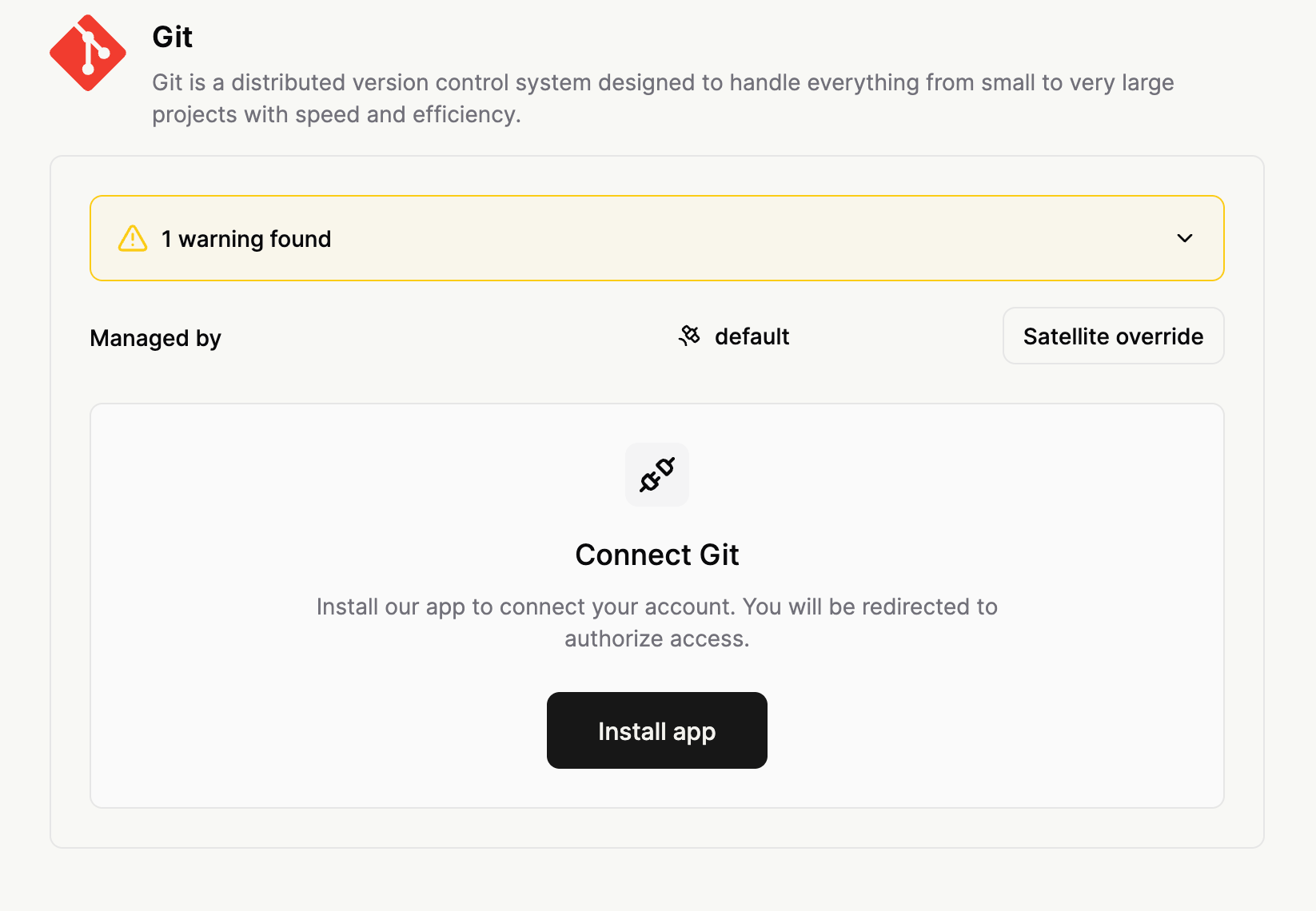
3. In Resolve UI, open your Git integration and click **Install GitHub App**.
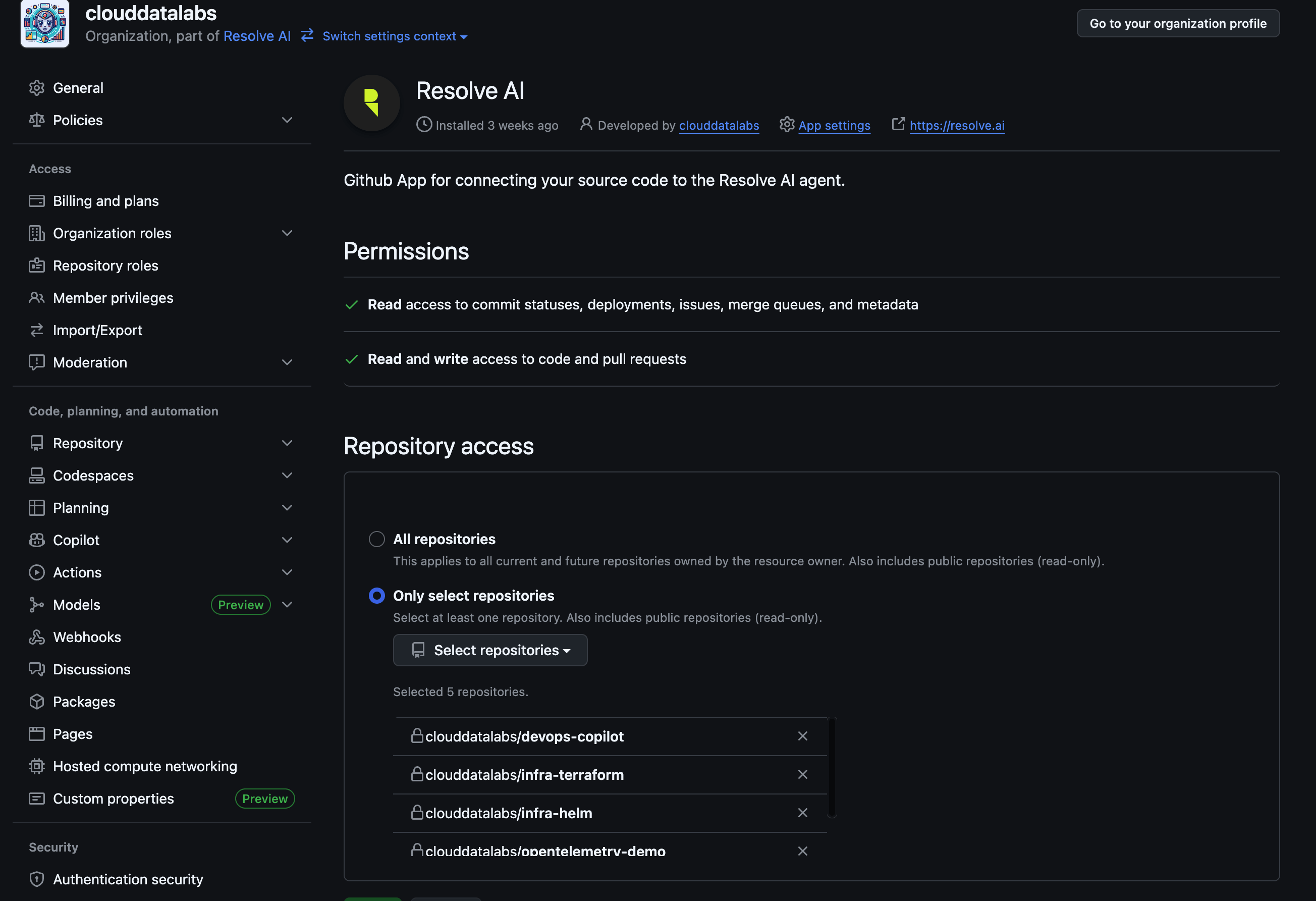
 4. Complete GitHub authorization and choose repositories.
 5. Verify health check and repository listing.
For a GitHub-specific walkthrough, see [App for GitHub](/app-for-github).
***
### Option 2: Bring Your Own GitHub App (GHE)
Use this option when you operate your own custom GitHub App. It works against any GitHub variant, github.com, GitHub Enterprise Cloud, or GitHub Enterprise Server (on-prem), including air-gapped GHE Server reachable only from inside your network.
The end-to-end walkthrough, creating the GitHub App, recommended permissions, generating the private key, locating App ID / Installation ID / API base URL, and the Satellite YAML + secret shape, lives on **[App for GitHub → Bring Your Own GitHub App](/app-for-github#bring-your-own-github-app)** (open the **Satellite** tab under [Step 7](/app-for-github#step-7-configure-the-resolve-integration)).
The minimal Satellite values are:
```yaml resolve-values.yaml theme={null}
integrations:
gitGhe:
type: git
create: true
secretName: git-credentials
connection:
authConfigs:
myGheApp: # Must match the key in the gheAuthCredentials secret
type: "ghe"
ghe:
baseUrl: "https://ghe.your-company.com/api/v3"
appId: "12345"
installationId: "67890"
gitVolume:
type: persistentVolumeClaim
```
Pair with a Kubernetes secret containing `gheAuthCredentials..privateKey`. For a self-signed GHE Server, also add `trustedCertificateOverrides.`, see [Custom SSL certificates](#custom-ssl-certificates).
#### Combining GHE with GitHub and token auth
A single Git integration can mix `github`, `ghe`, and `token` auth configs. Use this to cover, for example, github.com repos via the Resolve App plus an on-prem GHE instance plus a GitLab org over a PAT, all in one integration.
```yaml resolve-values.yaml theme={null}
integrations:
gitMulti:
type: git
create: true
secretName: git-credentials
connection:
authConfigs:
# Resolve-managed GitHub App on github.com
githubCloud:
type: "github"
# Custom GitHub App on a GHE Server instance
myGheApp:
type: "ghe"
ghe:
baseUrl: "https://ghe.your-company.com/api/v3"
appId: "12345"
installationId: "67890"
# GitLab via PAT
gitlabToken:
type: "token"
tokenAuthRemoteURLs:
- "https://gitlab.com/your-group/repo-a.git"
gitVolume:
type: persistentVolumeClaim
```
The matching secret holds credentials keyed by auth config name:
```yaml git-credentials.yaml theme={null}
apiVersion: v1
kind: Secret
type: Opaque
metadata:
name: git-credentials
stringData:
gheAuthCredentials: |
myGheApp:
privateKey: |
-----BEGIN RSA PRIVATE KEY-----
...
-----END RSA PRIVATE KEY-----
tokenAuthCredentials: |
gitlabToken:
username:
token:
```
The `github` auth type does not need a secret entry, its tokens are managed by GitHub App installation metadata refreshed by Resolve.
***
### Option 3: Token Auth
Token auth uses matching keys between `connection.authConfigs` and credentials in your Kubernetes secret.
### Step 1: Create access tokens
Create provider tokens first. See [Creating Personal Access Tokens](#creating-personal-access-tokens).
### Step 2: Create Kubernetes secret
```yaml git-credentials.yaml theme={null}
apiVersion: v1
kind: Secret
type: Opaque
metadata:
name: git-credentials
stringData:
tokenAuthCredentials: |
githubToken: # Key name used in Step 3 authConfigs
username:
token:
# Optional: per-auth custom certificate overrides
trustedCertificateOverrides: |
githubToken: | # Must use the same key name as tokenAuthCredentials/authConfigs
-----BEGIN CERTIFICATE-----
...
-----END CERTIFICATE-----
```
```yaml git-credentials.yaml theme={null}
apiVersion: v1
kind: Secret
type: Opaque
metadata:
name: git-credentials
stringData:
tokenAuthCredentials: |
githubOrgOneToken: # GitHub org one credentials
username:
token:
githubOrgTwoToken: # GitHub org two credentials
username:
token:
gitlabToken: # GitLab credentials
username:
token:
# Optional: per-auth custom certificate overrides
trustedCertificateOverrides: |
gitlabToken: | # Needed only for custom/self-signed GitLab certs
-----BEGIN CERTIFICATE-----
...
-----END CERTIFICATE-----
```
Apply secret:
```shell theme={null}
kubectl apply -f git-credentials.yaml
```
### Step 3: Configure integration
```yaml resolve-values.yaml theme={null}
integrations:
gitToken:
type: git
create: true
secretName: git-credentials
connection:
authConfigs:
githubToken: # Must match key in secret
type: "token"
tokenAuthRemoteURLs:
- "https://github.com/your-org/repo-1.git"
- "https://github.com/your-org/repo-2.git"
# Recommended for production:
gitVolume:
type: persistentVolumeClaim
```
```yaml resolve-values.yaml theme={null}
integrations:
gitToken:
type: git
create: true
secretName: git-credentials
connection:
authConfigs:
githubOrgOneToken: # Must match key in secret (GitHub org one)
type: "token"
tokenAuthRemoteURLs:
- "https://github.com/org-one/repo-1.git"
- "https://github.com/org-one/repo-2.git"
githubOrgTwoToken: # Must match key in secret (GitHub org two)
type: "token"
tokenAuthRemoteURLs:
- "https://github.com/org-two/repo-1.git"
gitlabToken: # Must match key in secret (GitLab)
type: "token"
tokenAuthRemoteURLs:
- "https://gitlab.com/group-one/repo-1.git"
- "https://gitlab.com/group-two/repo-2.git"
# Recommended for production:
gitVolume:
type: persistentVolumeClaim
```
### Step 4: Deploy
```shell theme={null}
helm upgrade --install resolve-satellite \
oci://registry-1.docker.io/resolveaihq/satellite-chart \
--values resolve-values.yaml
```
### Key matching rule
* `connection.authConfigs.` must match the credential key exactly:
* `tokenAuthCredentials.` for `type: token`
* `gheAuthCredentials.` for `type: ghe`
* If used, `trustedCertificateOverrides.` must use the same key.
### How token auth mapping works
* `authConfigs..tokenAuthRemoteURLs` defines which repositories use that auth config.
* `tokenAuthCredentials.` provides the username/token for those repositories.
* Optional `trustedCertificateOverrides.` adds a per-auth custom cert for TLS verification.
### How GHE auth mapping works
* `authConfigs..type: "ghe"` declares a BYO-GitHub-App auth config.
* `authConfigs..ghe.{baseUrl, appId, installationId}` points the Satellite at the right GitHub instance and app installation. Repositories are discovered automatically from the installation, no `tokenAuthRemoteURLs` needed.
* `gheAuthCredentials..privateKey` provides the PEM private key for the app.
* Optional `trustedCertificateOverrides.` adds a per-auth custom cert for self-signed GHE Server.
## Storage Configuration
Satellite clones repositories into `gitVolume`.
### Default (`emptyDir`)
* Ephemeral
* Default size: `10Gi`
* Full re-clone after pod restart
```yaml theme={null}
gitVolume:
type: emptyDir
emptyDir:
sizeLimit: 10Gi
```
### Recommended for production (PVC)
* Persistent across restarts
* Better for large repositories and faster restart recovery
```yaml theme={null}
gitVolume:
type: persistentVolumeClaim
persistentVolumeClaim:
spec:
accessModes:
- ReadWriteOnce
resources:
requests:
storage: 100Gi
```
## Advanced Configuration
### Custom SSL certificates
For self-hosted Git with private CA or self-signed certificates, set `trustedCertificateOverrides` using the auth config key.
```yaml git-credentials.yaml theme={null}
apiVersion: v1
kind: Secret
type: Opaque
metadata:
name: git-credentials
stringData:
tokenAuthCredentials: |
selfHosted:
username:
token:
trustedCertificateOverrides: |
selfHosted: |
-----BEGIN CERTIFICATE-----
...
-----END CERTIFICATE-----
```
### `gitSSLNoVerify` (use carefully)
```yaml theme={null}
connection:
gitSSLNoVerify: true
gitVolume:
type: persistentVolumeClaim
```
Disabling SSL verification weakens transport security. Prefer `trustedCertificateOverrides` when possible.
### `disableWrites`
```yaml theme={null}
connection:
disableWrites: true
gitVolume:
type: persistentVolumeClaim
```
Use this for strict read-only mode.
### `disabledSubcommands`
```yaml theme={null}
connection:
disabledSubcommands: ["config", "remote"]
gitVolume:
type: persistentVolumeClaim
```
Use this to block specific `git ` operations.
The connection schema supports inline credentials and certificate overrides.\
For Satellite deployments, we recommend storing `tokenAuthCredentials`, `gheAuthCredentials`, and `trustedCertificateOverrides` in a Kubernetes secret (`secretName`) instead of inline `resolve-values.yaml`.
```yaml theme={null}
connection:
authConfigs:
:
type: "token" | "github" | "ghe"
tokenAuthRemoteURLs: ["..."] # required for type: token
ghe: # required for type: ghe
baseUrl: "https://ghe.example.com/api/v3"
appId: "12345"
installationId: "67890"
tokenAuthCredentials: # schema-supported inline form
:
username: "..."
token: "..."
gheAuthCredentials: # schema-supported inline form
:
privateKey: |
-----BEGIN RSA PRIVATE KEY-----
...
-----END RSA PRIVATE KEY-----
trustedCertificateOverrides: # schema-supported inline form
: |
-----BEGIN CERTIFICATE-----
...
-----END CERTIFICATE-----
gitSSLNoVerify: false
disableWrites: true
disabledSubcommands: []
gitVolume:
type: persistentVolumeClaim
```
## Repository URL Formats
Use HTTPS URLs only.
Supported examples:
```text theme={null}
https://github.com/org-name/repo-name.git
https://gitlab.com/org-name/repo-name.git
https://bitbucket.org/org-name/repo-name.git
https://github.company.com/org-name/repo-name.git
```
## Creating Personal Access Tokens
Token auth needs a provider PAT whose scopes match the access you want (read-only, or read plus write for remediation), and for GitLab a project/group role that matches (Reporter to read, Developer to open MRs). See [Git overview → Creating access tokens](/git#creating-access-tokens) for the exact scopes and roles for each provider.
Create the token there, then store it under `tokenAuthCredentials` in your secret (see [Step 2](#step-2-create-kubernetes-secret)).
1. Integrations Gateway resolves auth configs and prepares tool commands.
2. GitHub auth repository lists come from GitHub installation metadata refresh (works for both `github` and `ghe` auth, `ghe` calls the configured `baseUrl`).
3. Token auth credentials/certs are resolved from the secret-backed connection data.
4. GHE auth credentials (private key) are resolved from `gheAuthCredentials` and used to mint short-lived installation tokens against the configured `baseUrl`.
5. Refresh uses `cloneOrFetch` with configured concurrency limits.
6. Read commands can execute against specific refs using temporary worktrees.
7. Command validation enforces path safety and blocked subcommands.
* Read capabilities: search, file read/list, git history/diff, metadata operations
* GitHub-specific read capabilities (reading PR data; reading GitHub Actions workflow runs / definitions and PR check status): available with `github` or `ghe` auth, or with `token` auth pointed at GitHub repos when the token grants the equivalent scopes (Actions, Checks, Pull requests, Contents, Metadata)
* Write/remediation capabilities: available when enabled (see `disableWrites`)
## Troubleshooting
* Verify token/username values in secret (token auth)
* Verify `gheAuthCredentials..privateKey` is valid PEM (GHE auth)
* Verify `authConfigs` keys match secret keys
* Verify Satellite can reach repository host (and the configured `ghe.baseUrl` for GHE auth)
* Verify certificate content is valid PEM for custom cert overrides
* Authentication failed: token invalid/expired or missing required repo permissions
* Network timeout/refusal: repository host unreachable from Satellite network
* Disk pressure: insufficient storage for clone/fetch operations
* Invalid URL format: URL must be HTTPS and reachable
* Check whether credentials changed recently
* Validate repository host connectivity from cluster
* Ensure there is enough storage headroom for fetch/submodule updates
* Check if `disableWrites` is explicitly `true`
* If omitted, token-only auth defaults to read-only
* Check Satellite version support (`v1.0.15+` required for remediation tools)
## Frequently Asked Questions
Repositories are refreshed during scheduled scrape/health workflows. In practice this is typically every few minutes depending on your org scrape cadence.
By default, write availability depends on auth type and `disableWrites`:
* Any `github` or `ghe` auth config + `disableWrites` omitted => writes enabled by default
* Token-only auth + `disableWrites` omitted => read-only by default
In both cases, PR creation/remediation still occurs through explicit user-invoked workflows.
Plan for total repository size plus git metadata and growth. A practical baseline is total repo size x 1.5 to 2.0.
Use PVC for production. Use `emptyDir` only when re-cloning after restarts is acceptable.
No. Use HTTPS repository URLs.
* `github` auth: Resolve-managed GitHub App on github.com. Tokens and metadata are managed by Resolve. Works only against github.com.
* `ghe` auth: Bring-your-own GitHub App on **any** GitHub instance (github.com, GitHub Enterprise Cloud, or GitHub Enterprise Server). You provide App ID, installation ID, private key, and the API base URL. Use this when you cannot install the Resolve GitHub App, or you need air-gapped GHE Server access.
* `token` auth: Direct username/PAT for any HTTPS Git host (GitLab, Bitbucket, Azure DevOps, GitHub via PAT, self-hosted Git).
All three can be read-only or write-enabled depending on `disableWrites` and Satellite version. Reading PR data and querying GitHub Actions / PR check status works with `github` or `ghe` auth, and with `token` auth pointed at GitHub repos as long as the token carries the equivalent scopes.
Yes. Multiple auth configs can coexist under `authConfigs`. For example, you can combine `github` auth for github.com repos, `ghe` auth for an on-prem GHE instance, and one or more `token` auth configs for GitLab/Bitbucket/etc, all in a single Git integration.
* GitHub / GHE auth: grant additional repos during app installation or update on the GitHub instance. They appear automatically on the next refresh.
* Token auth: add repository URLs under the correct `tokenAuthRemoteURLs` auth config and redeploy.
1. Generate new token(s)
2. Update the Kubernetes secret
3. Reapply secret
4. Restart Satellite pods if required by your secret propagation model
```shell theme={null}
kubectl apply -f git-credentials.yaml
kubectl rollout restart statefulset/resolve-satellite
```
Health checks and refresh operations for that auth config will fail until token credentials are updated.
Yes. Use multiple auth configs, each with different credentials and repository URL sets. This lets you isolate permissions by team, provider, or repository group.
There are no hardcoded per-repo size limits in docs-level config. Practical limits come from Satellite CPU, memory, network throughput, and storage capacity. Adjust resources and storage based on repo count/size and refresh concurrency.
Yes, when `disableWrites: false` and Satellite version support is available (`v1.0.15+`).
5. Verify health check and repository listing.
For a GitHub-specific walkthrough, see [App for GitHub](/app-for-github).
***
### Option 2: Bring Your Own GitHub App (GHE)
Use this option when you operate your own custom GitHub App. It works against any GitHub variant, github.com, GitHub Enterprise Cloud, or GitHub Enterprise Server (on-prem), including air-gapped GHE Server reachable only from inside your network.
The end-to-end walkthrough, creating the GitHub App, recommended permissions, generating the private key, locating App ID / Installation ID / API base URL, and the Satellite YAML + secret shape, lives on **[App for GitHub → Bring Your Own GitHub App](/app-for-github#bring-your-own-github-app)** (open the **Satellite** tab under [Step 7](/app-for-github#step-7-configure-the-resolve-integration)).
The minimal Satellite values are:
```yaml resolve-values.yaml theme={null}
integrations:
gitGhe:
type: git
create: true
secretName: git-credentials
connection:
authConfigs:
myGheApp: # Must match the key in the gheAuthCredentials secret
type: "ghe"
ghe:
baseUrl: "https://ghe.your-company.com/api/v3"
appId: "12345"
installationId: "67890"
gitVolume:
type: persistentVolumeClaim
```
Pair with a Kubernetes secret containing `gheAuthCredentials..privateKey`. For a self-signed GHE Server, also add `trustedCertificateOverrides.`, see [Custom SSL certificates](#custom-ssl-certificates).
#### Combining GHE with GitHub and token auth
A single Git integration can mix `github`, `ghe`, and `token` auth configs. Use this to cover, for example, github.com repos via the Resolve App plus an on-prem GHE instance plus a GitLab org over a PAT, all in one integration.
```yaml resolve-values.yaml theme={null}
integrations:
gitMulti:
type: git
create: true
secretName: git-credentials
connection:
authConfigs:
# Resolve-managed GitHub App on github.com
githubCloud:
type: "github"
# Custom GitHub App on a GHE Server instance
myGheApp:
type: "ghe"
ghe:
baseUrl: "https://ghe.your-company.com/api/v3"
appId: "12345"
installationId: "67890"
# GitLab via PAT
gitlabToken:
type: "token"
tokenAuthRemoteURLs:
- "https://gitlab.com/your-group/repo-a.git"
gitVolume:
type: persistentVolumeClaim
```
The matching secret holds credentials keyed by auth config name:
```yaml git-credentials.yaml theme={null}
apiVersion: v1
kind: Secret
type: Opaque
metadata:
name: git-credentials
stringData:
gheAuthCredentials: |
myGheApp:
privateKey: |
-----BEGIN RSA PRIVATE KEY-----
...
-----END RSA PRIVATE KEY-----
tokenAuthCredentials: |
gitlabToken:
username:
token:
```
The `github` auth type does not need a secret entry, its tokens are managed by GitHub App installation metadata refreshed by Resolve.
***
### Option 3: Token Auth
Token auth uses matching keys between `connection.authConfigs` and credentials in your Kubernetes secret.
### Step 1: Create access tokens
Create provider tokens first. See [Creating Personal Access Tokens](#creating-personal-access-tokens).
### Step 2: Create Kubernetes secret
```yaml git-credentials.yaml theme={null}
apiVersion: v1
kind: Secret
type: Opaque
metadata:
name: git-credentials
stringData:
tokenAuthCredentials: |
githubToken: # Key name used in Step 3 authConfigs
username:
token:
# Optional: per-auth custom certificate overrides
trustedCertificateOverrides: |
githubToken: | # Must use the same key name as tokenAuthCredentials/authConfigs
-----BEGIN CERTIFICATE-----
...
-----END CERTIFICATE-----
```
```yaml git-credentials.yaml theme={null}
apiVersion: v1
kind: Secret
type: Opaque
metadata:
name: git-credentials
stringData:
tokenAuthCredentials: |
githubOrgOneToken: # GitHub org one credentials
username:
token:
githubOrgTwoToken: # GitHub org two credentials
username:
token:
gitlabToken: # GitLab credentials
username:
token:
# Optional: per-auth custom certificate overrides
trustedCertificateOverrides: |
gitlabToken: | # Needed only for custom/self-signed GitLab certs
-----BEGIN CERTIFICATE-----
...
-----END CERTIFICATE-----
```
Apply secret:
```shell theme={null}
kubectl apply -f git-credentials.yaml
```
### Step 3: Configure integration
```yaml resolve-values.yaml theme={null}
integrations:
gitToken:
type: git
create: true
secretName: git-credentials
connection:
authConfigs:
githubToken: # Must match key in secret
type: "token"
tokenAuthRemoteURLs:
- "https://github.com/your-org/repo-1.git"
- "https://github.com/your-org/repo-2.git"
# Recommended for production:
gitVolume:
type: persistentVolumeClaim
```
```yaml resolve-values.yaml theme={null}
integrations:
gitToken:
type: git
create: true
secretName: git-credentials
connection:
authConfigs:
githubOrgOneToken: # Must match key in secret (GitHub org one)
type: "token"
tokenAuthRemoteURLs:
- "https://github.com/org-one/repo-1.git"
- "https://github.com/org-one/repo-2.git"
githubOrgTwoToken: # Must match key in secret (GitHub org two)
type: "token"
tokenAuthRemoteURLs:
- "https://github.com/org-two/repo-1.git"
gitlabToken: # Must match key in secret (GitLab)
type: "token"
tokenAuthRemoteURLs:
- "https://gitlab.com/group-one/repo-1.git"
- "https://gitlab.com/group-two/repo-2.git"
# Recommended for production:
gitVolume:
type: persistentVolumeClaim
```
### Step 4: Deploy
```shell theme={null}
helm upgrade --install resolve-satellite \
oci://registry-1.docker.io/resolveaihq/satellite-chart \
--values resolve-values.yaml
```
### Key matching rule
* `connection.authConfigs.` must match the credential key exactly:
* `tokenAuthCredentials.` for `type: token`
* `gheAuthCredentials.` for `type: ghe`
* If used, `trustedCertificateOverrides.` must use the same key.
### How token auth mapping works
* `authConfigs..tokenAuthRemoteURLs` defines which repositories use that auth config.
* `tokenAuthCredentials.` provides the username/token for those repositories.
* Optional `trustedCertificateOverrides.` adds a per-auth custom cert for TLS verification.
### How GHE auth mapping works
* `authConfigs..type: "ghe"` declares a BYO-GitHub-App auth config.
* `authConfigs..ghe.{baseUrl, appId, installationId}` points the Satellite at the right GitHub instance and app installation. Repositories are discovered automatically from the installation, no `tokenAuthRemoteURLs` needed.
* `gheAuthCredentials..privateKey` provides the PEM private key for the app.
* Optional `trustedCertificateOverrides.` adds a per-auth custom cert for self-signed GHE Server.
## Storage Configuration
Satellite clones repositories into `gitVolume`.
### Default (`emptyDir`)
* Ephemeral
* Default size: `10Gi`
* Full re-clone after pod restart
```yaml theme={null}
gitVolume:
type: emptyDir
emptyDir:
sizeLimit: 10Gi
```
### Recommended for production (PVC)
* Persistent across restarts
* Better for large repositories and faster restart recovery
```yaml theme={null}
gitVolume:
type: persistentVolumeClaim
persistentVolumeClaim:
spec:
accessModes:
- ReadWriteOnce
resources:
requests:
storage: 100Gi
```
## Advanced Configuration
### Custom SSL certificates
For self-hosted Git with private CA or self-signed certificates, set `trustedCertificateOverrides` using the auth config key.
```yaml git-credentials.yaml theme={null}
apiVersion: v1
kind: Secret
type: Opaque
metadata:
name: git-credentials
stringData:
tokenAuthCredentials: |
selfHosted:
username:
token:
trustedCertificateOverrides: |
selfHosted: |
-----BEGIN CERTIFICATE-----
...
-----END CERTIFICATE-----
```
### `gitSSLNoVerify` (use carefully)
```yaml theme={null}
connection:
gitSSLNoVerify: true
gitVolume:
type: persistentVolumeClaim
```
Disabling SSL verification weakens transport security. Prefer `trustedCertificateOverrides` when possible.
### `disableWrites`
```yaml theme={null}
connection:
disableWrites: true
gitVolume:
type: persistentVolumeClaim
```
Use this for strict read-only mode.
### `disabledSubcommands`
```yaml theme={null}
connection:
disabledSubcommands: ["config", "remote"]
gitVolume:
type: persistentVolumeClaim
```
Use this to block specific `git ` operations.
The connection schema supports inline credentials and certificate overrides.\
For Satellite deployments, we recommend storing `tokenAuthCredentials`, `gheAuthCredentials`, and `trustedCertificateOverrides` in a Kubernetes secret (`secretName`) instead of inline `resolve-values.yaml`.
```yaml theme={null}
connection:
authConfigs:
:
type: "token" | "github" | "ghe"
tokenAuthRemoteURLs: ["..."] # required for type: token
ghe: # required for type: ghe
baseUrl: "https://ghe.example.com/api/v3"
appId: "12345"
installationId: "67890"
tokenAuthCredentials: # schema-supported inline form
:
username: "..."
token: "..."
gheAuthCredentials: # schema-supported inline form
:
privateKey: |
-----BEGIN RSA PRIVATE KEY-----
...
-----END RSA PRIVATE KEY-----
trustedCertificateOverrides: # schema-supported inline form
: |
-----BEGIN CERTIFICATE-----
...
-----END CERTIFICATE-----
gitSSLNoVerify: false
disableWrites: true
disabledSubcommands: []
gitVolume:
type: persistentVolumeClaim
```
## Repository URL Formats
Use HTTPS URLs only.
Supported examples:
```text theme={null}
https://github.com/org-name/repo-name.git
https://gitlab.com/org-name/repo-name.git
https://bitbucket.org/org-name/repo-name.git
https://github.company.com/org-name/repo-name.git
```
## Creating Personal Access Tokens
Token auth needs a provider PAT whose scopes match the access you want (read-only, or read plus write for remediation), and for GitLab a project/group role that matches (Reporter to read, Developer to open MRs). See [Git overview → Creating access tokens](/git#creating-access-tokens) for the exact scopes and roles for each provider.
Create the token there, then store it under `tokenAuthCredentials` in your secret (see [Step 2](#step-2-create-kubernetes-secret)).
1. Integrations Gateway resolves auth configs and prepares tool commands.
2. GitHub auth repository lists come from GitHub installation metadata refresh (works for both `github` and `ghe` auth, `ghe` calls the configured `baseUrl`).
3. Token auth credentials/certs are resolved from the secret-backed connection data.
4. GHE auth credentials (private key) are resolved from `gheAuthCredentials` and used to mint short-lived installation tokens against the configured `baseUrl`.
5. Refresh uses `cloneOrFetch` with configured concurrency limits.
6. Read commands can execute against specific refs using temporary worktrees.
7. Command validation enforces path safety and blocked subcommands.
* Read capabilities: search, file read/list, git history/diff, metadata operations
* GitHub-specific read capabilities (reading PR data; reading GitHub Actions workflow runs / definitions and PR check status): available with `github` or `ghe` auth, or with `token` auth pointed at GitHub repos when the token grants the equivalent scopes (Actions, Checks, Pull requests, Contents, Metadata)
* Write/remediation capabilities: available when enabled (see `disableWrites`)
## Troubleshooting
* Verify token/username values in secret (token auth)
* Verify `gheAuthCredentials..privateKey` is valid PEM (GHE auth)
* Verify `authConfigs` keys match secret keys
* Verify Satellite can reach repository host (and the configured `ghe.baseUrl` for GHE auth)
* Verify certificate content is valid PEM for custom cert overrides
* Authentication failed: token invalid/expired or missing required repo permissions
* Network timeout/refusal: repository host unreachable from Satellite network
* Disk pressure: insufficient storage for clone/fetch operations
* Invalid URL format: URL must be HTTPS and reachable
* Check whether credentials changed recently
* Validate repository host connectivity from cluster
* Ensure there is enough storage headroom for fetch/submodule updates
* Check if `disableWrites` is explicitly `true`
* If omitted, token-only auth defaults to read-only
* Check Satellite version support (`v1.0.15+` required for remediation tools)
## Frequently Asked Questions
Repositories are refreshed during scheduled scrape/health workflows. In practice this is typically every few minutes depending on your org scrape cadence.
By default, write availability depends on auth type and `disableWrites`:
* Any `github` or `ghe` auth config + `disableWrites` omitted => writes enabled by default
* Token-only auth + `disableWrites` omitted => read-only by default
In both cases, PR creation/remediation still occurs through explicit user-invoked workflows.
Plan for total repository size plus git metadata and growth. A practical baseline is total repo size x 1.5 to 2.0.
Use PVC for production. Use `emptyDir` only when re-cloning after restarts is acceptable.
No. Use HTTPS repository URLs.
* `github` auth: Resolve-managed GitHub App on github.com. Tokens and metadata are managed by Resolve. Works only against github.com.
* `ghe` auth: Bring-your-own GitHub App on **any** GitHub instance (github.com, GitHub Enterprise Cloud, or GitHub Enterprise Server). You provide App ID, installation ID, private key, and the API base URL. Use this when you cannot install the Resolve GitHub App, or you need air-gapped GHE Server access.
* `token` auth: Direct username/PAT for any HTTPS Git host (GitLab, Bitbucket, Azure DevOps, GitHub via PAT, self-hosted Git).
All three can be read-only or write-enabled depending on `disableWrites` and Satellite version. Reading PR data and querying GitHub Actions / PR check status works with `github` or `ghe` auth, and with `token` auth pointed at GitHub repos as long as the token carries the equivalent scopes.
Yes. Multiple auth configs can coexist under `authConfigs`. For example, you can combine `github` auth for github.com repos, `ghe` auth for an on-prem GHE instance, and one or more `token` auth configs for GitLab/Bitbucket/etc, all in a single Git integration.
* GitHub / GHE auth: grant additional repos during app installation or update on the GitHub instance. They appear automatically on the next refresh.
* Token auth: add repository URLs under the correct `tokenAuthRemoteURLs` auth config and redeploy.
1. Generate new token(s)
2. Update the Kubernetes secret
3. Reapply secret
4. Restart Satellite pods if required by your secret propagation model
```shell theme={null}
kubectl apply -f git-credentials.yaml
kubectl rollout restart statefulset/resolve-satellite
```
Health checks and refresh operations for that auth config will fail until token credentials are updated.
Yes. Use multiple auth configs, each with different credentials and repository URL sets. This lets you isolate permissions by team, provider, or repository group.
There are no hardcoded per-repo size limits in docs-level config. Practical limits come from Satellite CPU, memory, network throughput, and storage capacity. Adjust resources and storage based on repo count/size and refresh concurrency.
Yes, when `disableWrites: false` and Satellite version support is available (`v1.0.15+`).