> ## Documentation Index
> Fetch the complete documentation index at: https://docs.resolve.ai/llms.txt
> Use this file to discover all available pages before exploring further.
# Git
Use the Git integration to connect ResolveAI to your codebase — to query code during investigations, pull relevant evidence, and propose code changes for you to review.
Resolve's Git integration is designed to fit how your organization is set up. It supports both a **cloud-only** and a **hybrid (Satellite-based)** architecture, and multiple authentication methods, so a single integration can cover github.com, GitHub Enterprise (Cloud or Server), GitLab, Bitbucket, Azure DevOps, and self-hosted Git.
***
## How Resolve connects to your codebase through Git
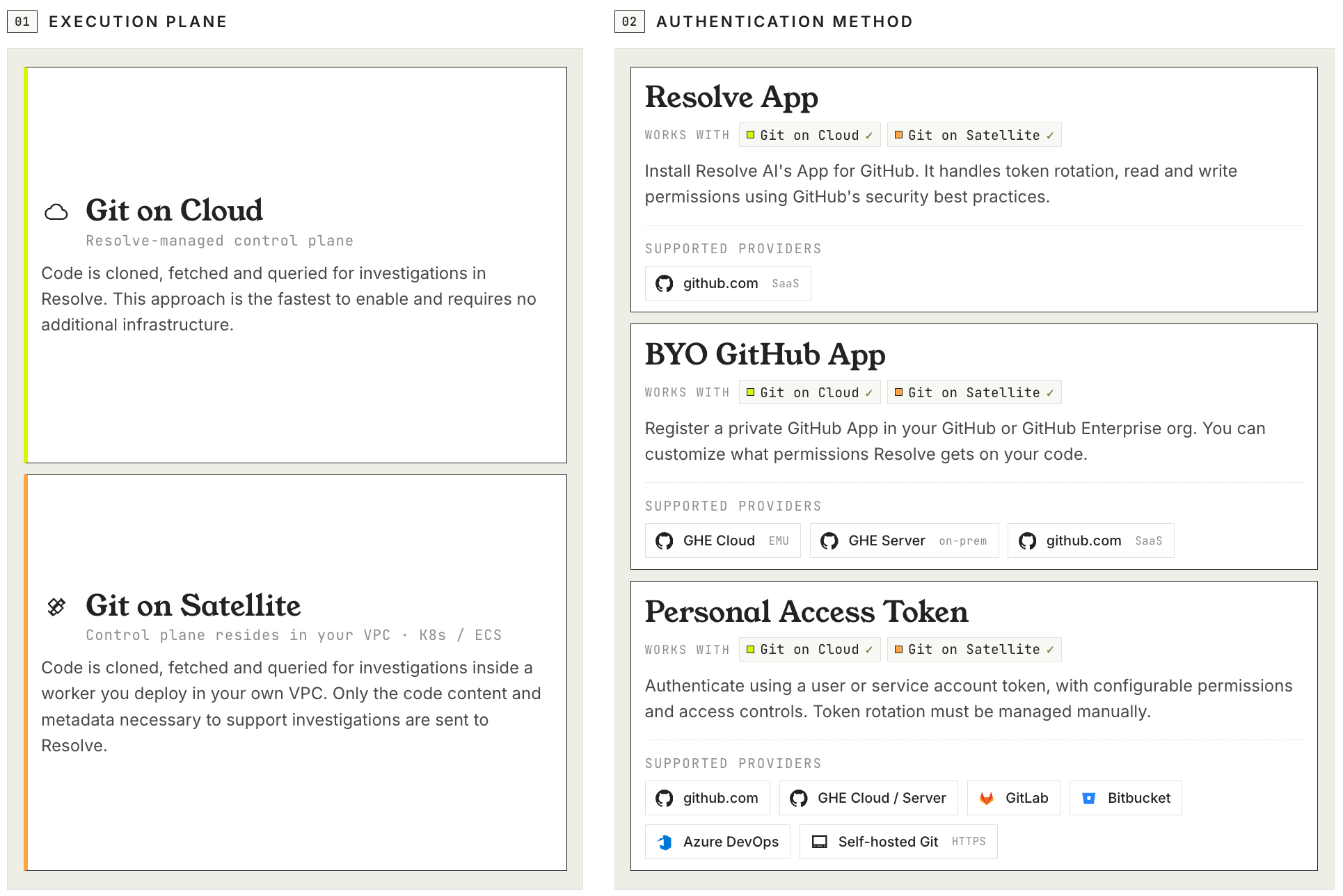
Connecting ResolveAI to your code comes down to two independent choices:
1. **Where Git commands run:** Git on Cloud (Resolve-managed) or Git on Satellite (your Kubernetes / ECS).
2. **How Resolve authenticates:** `github` (ResolveAI's App for GitHub), `ghe` (Bring-Your-Own GitHub App), or `token` (PAT). All three work on both Cloud and Satellite.
 ***
## 1. Choosing an execution plane: Cloud or Satellite
Your first decision is where Resolve actually clones, fetches, and queries your repositories. The right choice depends on your network reachability, your data residency requirements, and how much infrastructure your team is prepared to operate.
| Area | Git on Cloud | Git on Satellite |
| ------------------------------- | ------------------------------------ | ---------------------------------------------------------------------------------- |
| **Where Git commands run** | Resolve-managed cloud infrastructure | A Satellite worker you deploy in your environment |
| **Who operates infrastructure** | Resolve | Your team |
| **Repository reachability** | Reachable from Resolve cloud | Reachable from your Satellite, including private networks and air-gapped instances |
| **Storage location** | Resolve-managed persistent storage | A volume on your Satellite (PVC for Kubernetes, EFS for ECS) |
The Resolve Satellite is supported on Kubernetes and on AWS ECS Fargate. The Kubernetes deployment stores repositories on a `gitVolume` (PVC is recommended for production); the ECS deployment uses an EFS volume. Both are functionally identical, so the choice comes down to whichever infrastructure your team already operates.
Once you've decided, follow the matching setup guide:
* [**Set up Git on Cloud**](/git-on-cloud) for Resolve-managed execution
* [**Set up Git on Satellite (Kubernetes)**](/git-on-satellite) for in-cluster execution
* [**Set up Satellite on ECS**](/satellite-on-ecs) for AWS Fargate execution
***
## 2. Choosing an authentication method
After picking an execution plane, decide how Resolve proves identity to your Git host. All three auth types work on both Cloud and Satellite — the choice is driven by **which Git host your code lives on**, **your security policy**, and **how you want to manage the Git App**.
* **`github`** — Connects to github.com through ResolveAI's App for GitHub. You complete an OAuth-style installation, and Resolve handles token rotation automatically.
* **`ghe`** — Connects through a custom GitHub App that you own, on any GitHub variant (github.com, GitHub Enterprise Cloud, or GitHub Enterprise Server). You provide the App ID, installation ID, and private key, and Resolve calls the API base URL you configure.
* **`token`** — Connects to non-GitHub providers (GitLab, Bitbucket, Azure DevOps, self-hosted Git) or to GitHub via PAT. Resolve authenticates with the username and personal access token you provide.
**One integration can use all three auth types:** A single Git integration can carry multiple auth configs side-by-side under `authConfigs` — for example, one `github` config for github.com repos, one `ghe` config for an on-prem GHE instance, and one or more `token` configs for GitLab or Bitbucket. Each is keyed independently and matched to its credentials.
### Match your setup to an auth type
| Your setup | Pick | Why |
| ------------------------------------------------------------------------------------ | ---------------------------------------- | ------------------------------------------------------------------------------------------------------------------------------------------------------------------ |
| Standard github.com, no policy on which GitHub App you use | `github` | One-click install of ResolveAI's App for GitHub — no app credentials, no private key, no base URL. Fastest path. |
| github.com, but compliance / audit / scoped permissions require a customer-owned app | `ghe` | You operate the app, control the permission set, and rotate keys on your schedule. Works against `https://api.github.com`. |
| GitHub Enterprise Cloud (`*.ghe.com`) | `ghe` | ResolveAI's App for GitHub is github.com-only; GHE Cloud requires your own app on your tenant. |
| GitHub Enterprise Server (on-prem), reachable from Resolve cloud | `ghe` on Cloud | Your own app on your GHE Server, with `baseUrl` pointing at `/api/v3`. |
| GitHub Enterprise Server (on-prem), only reachable from inside your network | `ghe` on Satellite | Code never leaves your network. The Satellite reaches GHE Server directly. |
| GitLab, Bitbucket, Azure DevOps, self-hosted Git, or GitHub via PAT | `token` | App-based auth doesn't apply for non-GitHub providers. For GitHub via PAT, use this when an app install is impossible (locked-down org, individual-account repos). |
| Mixed providers (e.g. github.com + on-prem GHE + GitLab) | Multiple auth configs in one integration | `github` + `ghe` + `token` can coexist under `authConfigs`. |
Once you've decided, follow the matching walkthrough:
* [**Connect via ResolveAI's App for GitHub**](/app-for-github#connect-via-the-resolve-managed-app) for `github` auth on github.com
* [**Bring Your Own GitHub App**](/app-for-github#bring-your-own-github-app) for `ghe` auth (github.com, GHE Cloud, or GHE Server)
* For `token` auth, first [create the PAT](#creating-access-tokens), then complete the connection under Option 3 in the [Cloud](/git-on-cloud#option-3-token-auth) or [Satellite](/git-on-satellite#option-3-token-auth) guide
***
## What Resolve can do once connected: reads vs writes
These behaviors apply to both Cloud and Satellite:
* **Reads are always enabled.** Cloning, fetching, searching, reading files, viewing history, generating diffs, and inspecting blame data.
* **Write/remediation tools** (proposing code changes, opening PRs) are controlled by `disableWrites`:
* With a `github` or `ghe` auth config, writes are **enabled by default**.
* With token-only auth, writes are **disabled by default**.
* Set `disableWrites` explicitly in your connection config to override either default.
For the full schema (`authConfigs`, `tokenAuthCredentials`, `gheAuthCredentials`, `disabledSubcommands`, certificate overrides), see the [Git on Cloud](/git-on-cloud) or [Git on Satellite](/git-on-satellite) setup guide.
***
## Creating access tokens
When you use `token` auth, you provide a username and personal access token (PAT) that Resolve uses to authenticate to your Git host. The steps below apply to every execution plane. Create the token here, then follow your setup guide ([Cloud](/git-on-cloud#option-3-token-auth), [Satellite](/git-on-satellite#option-3-token-auth), or [ECS](/satellite-on-ecs#b-git-integration-credentials-token-auth-only)) for where to store it.
Every token can be created in one of two flavours, regardless of provider:
* **Write (remediation), recommended**: Resolve investigates and also proposes fixes, pushing a branch and opening a pull/merge request for your review. Requires write scopes on the token **and** `disableWrites: false` on the connection.
* **Read-only (restricted)**: Resolve clones code and reads commits, branches, pull/merge requests, pipelines/CI, and metadata, but cannot open PRs/MRs. This is the technical default for token-only auth (`disableWrites: true`). Choose it only if your policy requires investigate-only access.
Pick the flavour that matches how you want to use Resolve.
### GitHub
GitHub supports fine-grained and classic PATs.
1. Go to **Settings** > **Developer settings** > **Personal access tokens** > **Fine-grained tokens**.
2. Click **Generate new token** and set a name and expiration.
3. Choose the resource owner and select the repositories to grant access to.
4. Set repository permissions:
* **Read and write** on **Contents** (code) and **Pull requests**. These two enable pull-request creation. Set them to **Read-only** if you only need investigation reads.
* **Read-only** on **Metadata** (mandatory), **Actions**, **Checks**, **Commit statuses**, **Deployments**, **Discussions**, **Issues**, and **Merge queues**.
5. If your org uses SSO, authorize the token for SSO after creation.
6. Generate and copy the token.
1. Go to **Settings** > **Developer settings** > **Personal access tokens** > **Tokens (classic)**.
2. Generate a token and set an expiration.
3. Select scopes:
* Private repositories: `repo`.
* Public-only workflows: `public_repo`.
4. Authorize SSO for your org if required.
5. Copy the token.
Classic PATs with `repo` scope are broad. Prefer fine-grained PATs when possible.
### GitLab
GitLab access is gated by **two** independent controls, and you must satisfy both:
1. **Token scopes**: the checkboxes you select when creating the PAT.
2. **Membership role**: the role (Guest, Reporter, Developer, and so on) the token's owner has on the projects or groups you connect.
A token's effective access is the **intersection** of its scopes and the owner's role. An `api`-scoped token owned by a Reporter still cannot push or open merge requests. Pick the flavour that matches what you want Resolve to do.
Lets Resolve investigate and open merge requests for your review. Includes every read capability, plus branch push and MR creation.
1. Go to **Preferences** > **Access Tokens** (or use a project/group access token).
2. Create a token with an expiration.
3. Select scope:
* `api`: the only read-write API scope. It covers MR creation and also includes Git-over-HTTPS clone/fetch/push, so it subsumes `read_repository`/`write_repository`.
`write_repository` is **not** sufficient on its own. It only enables Git push over HTTPS and does not support API authentication, so it cannot create a merge request.
4. Ensure the owner has at least the **Developer** role on the connected projects/groups. Developer is the minimum role that can push branches and create merge requests.
5. Copy the token.
Set `disableWrites: false` on the connection to allow write/remediation tools.
Lets Resolve clone code and read commits, branches, merge requests, pipelines, CI job logs, and project metadata, but not open merge requests. Choose this only if your policy requires investigate-only access.
1. Go to **Preferences** > **Access Tokens** (for a personal token), or use a [project/group access token](https://docs.gitlab.com/user/project/settings/project_access_tokens/) to scope it to specific repos.
2. Create a token with an expiration.
3. Select scopes:
* `read_repository`: clone/fetch code over HTTPS.
* `read_api`: read merge requests, pipelines, jobs, commits, and metadata via the GitLab API.
Both are required. `read_repository` alone does not grant API reads of MRs/pipelines, and `read_api` alone does not grant Git-over-HTTPS clone.
4. Ensure the owner has at least the **Reporter** role on the connected projects/groups. On private projects, Guest cannot read code, so Reporter is the minimum.
5. Copy the token.
Keep `disableWrites: true` (the default for token-only auth) for this flavour.
Classic GitLab PATs are **not** per-repository like GitHub fine-grained tokens. They can access every project the owning user can. To limit blast radius, use a [project or group access token](https://docs.gitlab.com/user/project/settings/project_access_tokens/) (assign it the Reporter or Developer role per the flavour above) or a [fine-grained personal access token](https://docs.gitlab.com/auth/tokens/fine_grained_access_tokens/) instead of a classic PAT.
### Other providers (Bitbucket, Azure DevOps, self-hosted)
Token auth works with any provider that supports HTTPS PATs. The principle is the same as above: grant the minimum the flavour needs.
* **Read-only**: scopes that allow repository read/clone plus reading pull requests and pipelines/builds (e.g. Bitbucket **Repositories: Read** + **Pull requests: Read** + **Pipelines: Read**; Azure DevOps **Code (Read)** + **Build (Read)**).
* **Write (remediation)**: add the provider's repository-write and pull-request-write scopes so Resolve can push branches and open PRs.
If your host uses a custom or self-signed certificate, see the certificate override options in the [Satellite setup guide](/git-on-satellite#custom-ssl-certificates).
***
## Get Started
| You want… | Start here |
| --------------------------------------- | --------------------------------------------------------------------------------------- |
| Fastest onboarding, no infra work | [Set up Git on Cloud](/git-on-cloud) |
| In-cluster execution on Kubernetes | [Set up Git on Satellite](/git-on-satellite) |
| AWS-native execution without Kubernetes | [Set up Satellite on ECS](/satellite-on-ecs) |
| ResolveAI's App for GitHub walkthrough | [App for GitHub → ResolveAI's App](/app-for-github#connect-via-the-resolve-managed-app) |
| Bring-Your-Own GitHub App walkthrough | [App for GitHub → BYO GitHub App](/app-for-github#bring-your-own-github-app) |
***
## 1. Choosing an execution plane: Cloud or Satellite
Your first decision is where Resolve actually clones, fetches, and queries your repositories. The right choice depends on your network reachability, your data residency requirements, and how much infrastructure your team is prepared to operate.
| Area | Git on Cloud | Git on Satellite |
| ------------------------------- | ------------------------------------ | ---------------------------------------------------------------------------------- |
| **Where Git commands run** | Resolve-managed cloud infrastructure | A Satellite worker you deploy in your environment |
| **Who operates infrastructure** | Resolve | Your team |
| **Repository reachability** | Reachable from Resolve cloud | Reachable from your Satellite, including private networks and air-gapped instances |
| **Storage location** | Resolve-managed persistent storage | A volume on your Satellite (PVC for Kubernetes, EFS for ECS) |
The Resolve Satellite is supported on Kubernetes and on AWS ECS Fargate. The Kubernetes deployment stores repositories on a `gitVolume` (PVC is recommended for production); the ECS deployment uses an EFS volume. Both are functionally identical, so the choice comes down to whichever infrastructure your team already operates.
Once you've decided, follow the matching setup guide:
* [**Set up Git on Cloud**](/git-on-cloud) for Resolve-managed execution
* [**Set up Git on Satellite (Kubernetes)**](/git-on-satellite) for in-cluster execution
* [**Set up Satellite on ECS**](/satellite-on-ecs) for AWS Fargate execution
***
## 2. Choosing an authentication method
After picking an execution plane, decide how Resolve proves identity to your Git host. All three auth types work on both Cloud and Satellite — the choice is driven by **which Git host your code lives on**, **your security policy**, and **how you want to manage the Git App**.
* **`github`** — Connects to github.com through ResolveAI's App for GitHub. You complete an OAuth-style installation, and Resolve handles token rotation automatically.
* **`ghe`** — Connects through a custom GitHub App that you own, on any GitHub variant (github.com, GitHub Enterprise Cloud, or GitHub Enterprise Server). You provide the App ID, installation ID, and private key, and Resolve calls the API base URL you configure.
* **`token`** — Connects to non-GitHub providers (GitLab, Bitbucket, Azure DevOps, self-hosted Git) or to GitHub via PAT. Resolve authenticates with the username and personal access token you provide.
**One integration can use all three auth types:** A single Git integration can carry multiple auth configs side-by-side under `authConfigs` — for example, one `github` config for github.com repos, one `ghe` config for an on-prem GHE instance, and one or more `token` configs for GitLab or Bitbucket. Each is keyed independently and matched to its credentials.
### Match your setup to an auth type
| Your setup | Pick | Why |
| ------------------------------------------------------------------------------------ | ---------------------------------------- | ------------------------------------------------------------------------------------------------------------------------------------------------------------------ |
| Standard github.com, no policy on which GitHub App you use | `github` | One-click install of ResolveAI's App for GitHub — no app credentials, no private key, no base URL. Fastest path. |
| github.com, but compliance / audit / scoped permissions require a customer-owned app | `ghe` | You operate the app, control the permission set, and rotate keys on your schedule. Works against `https://api.github.com`. |
| GitHub Enterprise Cloud (`*.ghe.com`) | `ghe` | ResolveAI's App for GitHub is github.com-only; GHE Cloud requires your own app on your tenant. |
| GitHub Enterprise Server (on-prem), reachable from Resolve cloud | `ghe` on Cloud | Your own app on your GHE Server, with `baseUrl` pointing at `/api/v3`. |
| GitHub Enterprise Server (on-prem), only reachable from inside your network | `ghe` on Satellite | Code never leaves your network. The Satellite reaches GHE Server directly. |
| GitLab, Bitbucket, Azure DevOps, self-hosted Git, or GitHub via PAT | `token` | App-based auth doesn't apply for non-GitHub providers. For GitHub via PAT, use this when an app install is impossible (locked-down org, individual-account repos). |
| Mixed providers (e.g. github.com + on-prem GHE + GitLab) | Multiple auth configs in one integration | `github` + `ghe` + `token` can coexist under `authConfigs`. |
Once you've decided, follow the matching walkthrough:
* [**Connect via ResolveAI's App for GitHub**](/app-for-github#connect-via-the-resolve-managed-app) for `github` auth on github.com
* [**Bring Your Own GitHub App**](/app-for-github#bring-your-own-github-app) for `ghe` auth (github.com, GHE Cloud, or GHE Server)
* For `token` auth, first [create the PAT](#creating-access-tokens), then complete the connection under Option 3 in the [Cloud](/git-on-cloud#option-3-token-auth) or [Satellite](/git-on-satellite#option-3-token-auth) guide
***
## What Resolve can do once connected: reads vs writes
These behaviors apply to both Cloud and Satellite:
* **Reads are always enabled.** Cloning, fetching, searching, reading files, viewing history, generating diffs, and inspecting blame data.
* **Write/remediation tools** (proposing code changes, opening PRs) are controlled by `disableWrites`:
* With a `github` or `ghe` auth config, writes are **enabled by default**.
* With token-only auth, writes are **disabled by default**.
* Set `disableWrites` explicitly in your connection config to override either default.
For the full schema (`authConfigs`, `tokenAuthCredentials`, `gheAuthCredentials`, `disabledSubcommands`, certificate overrides), see the [Git on Cloud](/git-on-cloud) or [Git on Satellite](/git-on-satellite) setup guide.
***
## Creating access tokens
When you use `token` auth, you provide a username and personal access token (PAT) that Resolve uses to authenticate to your Git host. The steps below apply to every execution plane. Create the token here, then follow your setup guide ([Cloud](/git-on-cloud#option-3-token-auth), [Satellite](/git-on-satellite#option-3-token-auth), or [ECS](/satellite-on-ecs#b-git-integration-credentials-token-auth-only)) for where to store it.
Every token can be created in one of two flavours, regardless of provider:
* **Write (remediation), recommended**: Resolve investigates and also proposes fixes, pushing a branch and opening a pull/merge request for your review. Requires write scopes on the token **and** `disableWrites: false` on the connection.
* **Read-only (restricted)**: Resolve clones code and reads commits, branches, pull/merge requests, pipelines/CI, and metadata, but cannot open PRs/MRs. This is the technical default for token-only auth (`disableWrites: true`). Choose it only if your policy requires investigate-only access.
Pick the flavour that matches how you want to use Resolve.
### GitHub
GitHub supports fine-grained and classic PATs.
1. Go to **Settings** > **Developer settings** > **Personal access tokens** > **Fine-grained tokens**.
2. Click **Generate new token** and set a name and expiration.
3. Choose the resource owner and select the repositories to grant access to.
4. Set repository permissions:
* **Read and write** on **Contents** (code) and **Pull requests**. These two enable pull-request creation. Set them to **Read-only** if you only need investigation reads.
* **Read-only** on **Metadata** (mandatory), **Actions**, **Checks**, **Commit statuses**, **Deployments**, **Discussions**, **Issues**, and **Merge queues**.
5. If your org uses SSO, authorize the token for SSO after creation.
6. Generate and copy the token.
1. Go to **Settings** > **Developer settings** > **Personal access tokens** > **Tokens (classic)**.
2. Generate a token and set an expiration.
3. Select scopes:
* Private repositories: `repo`.
* Public-only workflows: `public_repo`.
4. Authorize SSO for your org if required.
5. Copy the token.
Classic PATs with `repo` scope are broad. Prefer fine-grained PATs when possible.
### GitLab
GitLab access is gated by **two** independent controls, and you must satisfy both:
1. **Token scopes**: the checkboxes you select when creating the PAT.
2. **Membership role**: the role (Guest, Reporter, Developer, and so on) the token's owner has on the projects or groups you connect.
A token's effective access is the **intersection** of its scopes and the owner's role. An `api`-scoped token owned by a Reporter still cannot push or open merge requests. Pick the flavour that matches what you want Resolve to do.
Lets Resolve investigate and open merge requests for your review. Includes every read capability, plus branch push and MR creation.
1. Go to **Preferences** > **Access Tokens** (or use a project/group access token).
2. Create a token with an expiration.
3. Select scope:
* `api`: the only read-write API scope. It covers MR creation and also includes Git-over-HTTPS clone/fetch/push, so it subsumes `read_repository`/`write_repository`.
`write_repository` is **not** sufficient on its own. It only enables Git push over HTTPS and does not support API authentication, so it cannot create a merge request.
4. Ensure the owner has at least the **Developer** role on the connected projects/groups. Developer is the minimum role that can push branches and create merge requests.
5. Copy the token.
Set `disableWrites: false` on the connection to allow write/remediation tools.
Lets Resolve clone code and read commits, branches, merge requests, pipelines, CI job logs, and project metadata, but not open merge requests. Choose this only if your policy requires investigate-only access.
1. Go to **Preferences** > **Access Tokens** (for a personal token), or use a [project/group access token](https://docs.gitlab.com/user/project/settings/project_access_tokens/) to scope it to specific repos.
2. Create a token with an expiration.
3. Select scopes:
* `read_repository`: clone/fetch code over HTTPS.
* `read_api`: read merge requests, pipelines, jobs, commits, and metadata via the GitLab API.
Both are required. `read_repository` alone does not grant API reads of MRs/pipelines, and `read_api` alone does not grant Git-over-HTTPS clone.
4. Ensure the owner has at least the **Reporter** role on the connected projects/groups. On private projects, Guest cannot read code, so Reporter is the minimum.
5. Copy the token.
Keep `disableWrites: true` (the default for token-only auth) for this flavour.
Classic GitLab PATs are **not** per-repository like GitHub fine-grained tokens. They can access every project the owning user can. To limit blast radius, use a [project or group access token](https://docs.gitlab.com/user/project/settings/project_access_tokens/) (assign it the Reporter or Developer role per the flavour above) or a [fine-grained personal access token](https://docs.gitlab.com/auth/tokens/fine_grained_access_tokens/) instead of a classic PAT.
### Other providers (Bitbucket, Azure DevOps, self-hosted)
Token auth works with any provider that supports HTTPS PATs. The principle is the same as above: grant the minimum the flavour needs.
* **Read-only**: scopes that allow repository read/clone plus reading pull requests and pipelines/builds (e.g. Bitbucket **Repositories: Read** + **Pull requests: Read** + **Pipelines: Read**; Azure DevOps **Code (Read)** + **Build (Read)**).
* **Write (remediation)**: add the provider's repository-write and pull-request-write scopes so Resolve can push branches and open PRs.
If your host uses a custom or self-signed certificate, see the certificate override options in the [Satellite setup guide](/git-on-satellite#custom-ssl-certificates).
***
## Get Started
| You want… | Start here |
| --------------------------------------- | --------------------------------------------------------------------------------------- |
| Fastest onboarding, no infra work | [Set up Git on Cloud](/git-on-cloud) |
| In-cluster execution on Kubernetes | [Set up Git on Satellite](/git-on-satellite) |
| AWS-native execution without Kubernetes | [Set up Satellite on ECS](/satellite-on-ecs) |
| ResolveAI's App for GitHub walkthrough | [App for GitHub → ResolveAI's App](/app-for-github#connect-via-the-resolve-managed-app) |
| Bring-Your-Own GitHub App walkthrough | [App for GitHub → BYO GitHub App](/app-for-github#bring-your-own-github-app) |